
A domestic solar installation can be producing electricity, storing energy and heating water at the same time. The opportunity is to coordinate those jobs: use solar energy when it is available, preserve a useful battery reserve and take advantage of cheaper grid electricity when the forecast suggests a poor solar day. Impact developed a mini-PC controller and monitoring website to bring those decisions together.
Better decisions from more than a battery reading
The controller combines inverter telemetry, inverter-reported battery state of charge (SOC), forecast cloud cover, configured electricity-tariff windows, household load and water temperatures. A C#/.NET desktop application runs on a mini PC attached to an Axpert-family inverter, while smart sockets and relays control an immersion heater and the electronic valve on a solar-thermal heating circuit.
The aim is to make the existing installation work more effectively as a system. Coordinating when energy is stored, when grid support is used and when water is heated can make a substantial difference to solar utilisation and operating costs, particularly where equipment would otherwise follow independent fixed schedules. The result depends on the installation, tariff, weather and household demand; the project does not establish a measured percentage saving.
The connected solar-control system
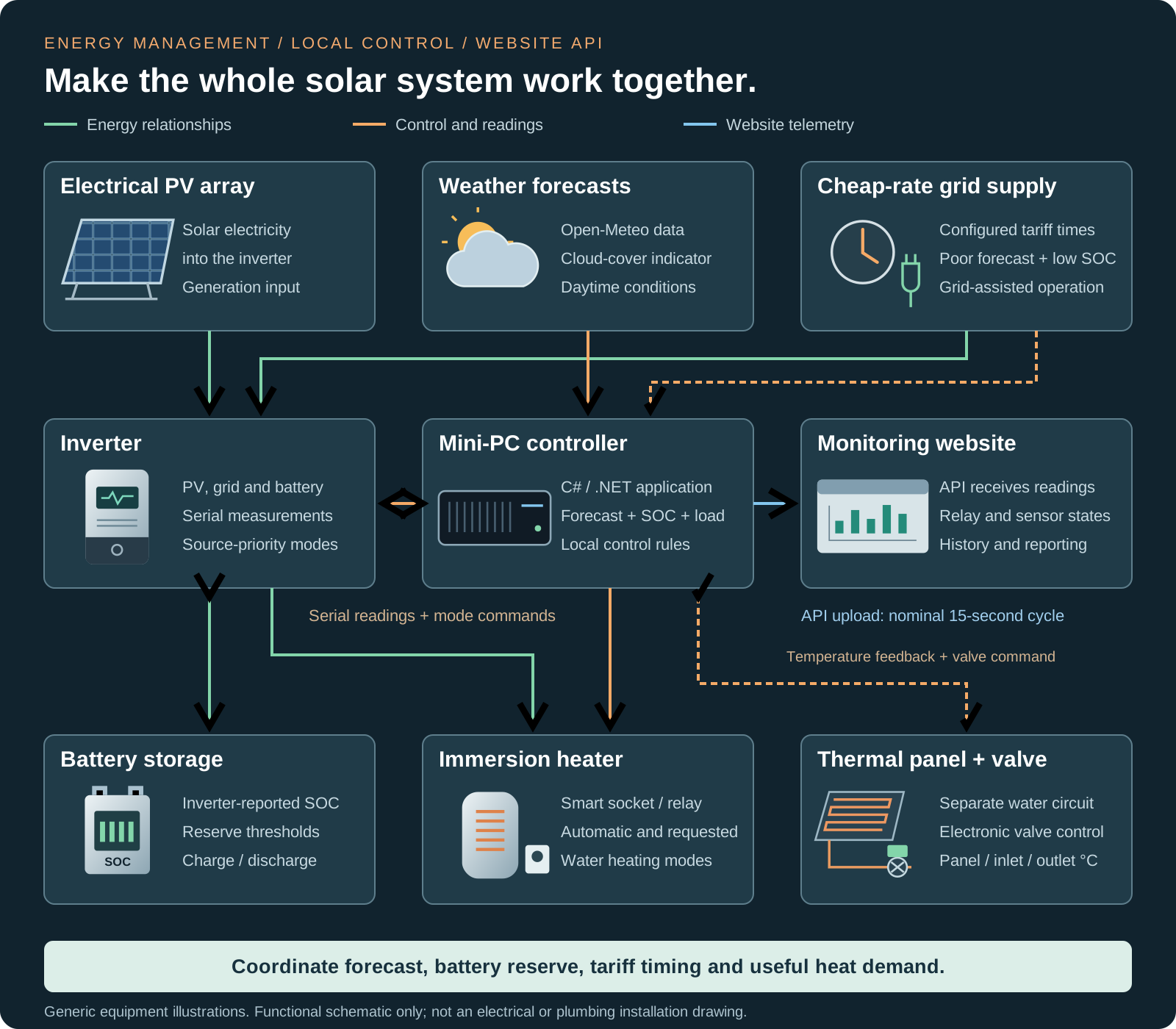
The schematic separates electricity generation and storage from the solar-thermal water circuit. Solid green paths show energy relationships, orange paths show local control and sensing, and blue shows the website monitoring link. It is a functional overview, not an electrical or plumbing installation drawing.
Forecast-aware grid and battery priorities
The software retrieves hourly weather information from Open-Meteo and derives a cloud-cover indicator for the configured daytime period. It compares averaged low and mid-level cloud cover and uses the higher value. This is a practical forecast input to the control rules, rather than a calculation of the exact electricity the PV array will produce.
During the configured lower-cost window, the controller can select grid-assisted operation when cloud cover is above the installation's threshold and SOC is below its target. When the forecast is more favourable, a lower reserve is used so the system can rely more on the solar energy expected during the day.
The application changes the inverter's output-source priority between solar/utility/battery and solar/battery/utility modes. The inverter's own configuration governs the charging behaviour associated with those modes. Separate thresholds for entering and leaving a mode provide hysteresis, helping avoid unnecessary switching around a single SOC value.
Use available electrical headroom to heat water
The immersion-heater rule looks for a high battery charge, a PV-input voltage indicating solar input is present, the appropriate inverter mode and enough headroom in the reported household load. That creates an opportunity to heat water when conditions suit the wider system.
The automatic rule switches the heater off when battery charge falls or the reported load reaches its upper threshold. The interface also includes scheduled and operator-requested heating modes, so the application can support household needs as well as opportunistic heating. Those modes are distinct from the normal automatic rule.
Control the solar-thermal heating circuit using temperatures
The solar-thermal water panel is a separate heat source from the electrical PV array. Its relay-driven valve is controlled using temperatures from the panel, water inlet and water outlet. The software checks whether useful heat is available before enabling the circuit, then reviews temperature and differential conditions after a minimum run period.
This connects heat collection to the conditions in the circuit. It supports a more informed decision than opening a valve on a fixed timer regardless of whether the panel can contribute useful heat.
The rules used in this installation
The following values describe the reviewed application's installation-specific configuration and logic. They illustrate the software development; thresholds and schedules need to be chosen for the actual equipment and operating requirements.
| Decision | Reviewed rule |
|---|---|
| Forecast input | Cloud-cover threshold 30%; configured daytime analysis with an hour of margin at each end. Weather is refreshed approximately every two hours and on a date change, with retry spacing after an unsuccessful request. |
| Lower-cost eligibility | Configured window 00:01–07:59; this installation also treats weekends as eligible. Generator and full-charge operator modes can widen eligibility. These are local settings, not live tariff-market data. |
| Poor forecast or full-charge request | In the eligible period, select grid-assisted priority below 85% SOC; return to solar/battery priority at 98% or above. Between those thresholds, leave the current priority unchanged. |
| Better forecast | In the eligible period, select grid-assisted priority at 30% SOC or below, then return to solar/battery priority above 40%. |
| Outside the eligible period | Use grid-assisted priority at 25% SOC or below; return to solar/battery priority above 30%. |
| Automatic immersion start | Heater off, SOC at least 95%, PV input above 60 V, reported load below 3,000 W and solar/battery/utility priority selected. |
| Automatic immersion stop | Normal automatic operation: SOC at or below 93%, or heater on with reported load at least 4,500 W. Operator-forced operation has separate stop logic. |
| Scheduled heating | Enabled schedule: a four-minute start window at the configured time, with SOC above 30% and grid voltage above 60 V. The reviewed schedule requests a 75-minute run beginning at 05:45; operator-requested runs are also available. |
| Thermal circuit start | When enabled and off, panel temperature above 50°C, plus either the first run that day or a panel-to-inlet differential above 8°C. |
| Thermal circuit stop | After more than five minutes running: panel below 40°C, outlet-to-inlet difference at most 2°C, or panel-to-inlet difference at most 8°C. |
| Operational alerts | Low-grid-voltage and daytime low-PV-voltage conditions produce rate-limited email alerts and condition-clear messages. Polling failures are logged and retried. |
Local decisions, with monitoring through a website API
The desktop application reads inverter status over its serial connection and communicates with Shelly devices on the local network. Its timer has a nominal 15-second interval; processing and failed requests can affect the actual time between successful uploads.
Inverter measurements, operating mode, relay states and temperature readings are sent to the website API. The Laravel monitoring application stores the incoming records and presents status and historical reporting, giving the owner a way to review what the system has been doing.
The local heating decisions are kept separate from a successful website upload. Request timeouts, device-offline handling, diagnostic logs and polling retries support the operation when a connection or device needs attention.
The value of connected energy-management software
- Plan around the next solar period: use forecast conditions when choosing the battery reserve and grid-support strategy.
- Use tariff timing: favour eligible cheaper periods for grid-assisted operation when the rules call for it.
- Coordinate electrical demand: consider battery charge and reported load before automatically adding immersion heating.
- Make use of collected heat: control the thermal circuit using panel and water temperatures.
- See the results: connect local control decisions with timestamped web monitoring and historical records.
The engineering combines C#/.NET device control, serial-protocol integration, local smart relays, external weather data and a website API. It is an example of embedded and IoT software development connecting physical equipment with business logic and useful reporting.
Explore our Solarshare solar-design and generation-modelling platform, or talk to Impact about energy monitoring, equipment integration or a controller built around your operating requirements.